All packagesWatch it in the video (2:27)

Reception & Triage: patient registration and emergency triage in seconds

Reception is the first thing a patient sees, and the first place where errors creep in: a duplicate record, missing details, or a patient lost between departments. ClinivaSys turns reception into a fast, accurate workstation: registration in seconds, color-coded emergency triage, and immediate routing to the right clinic, all connected to every other department the moment the record is saved.

Works offlineOn a server inside your facility

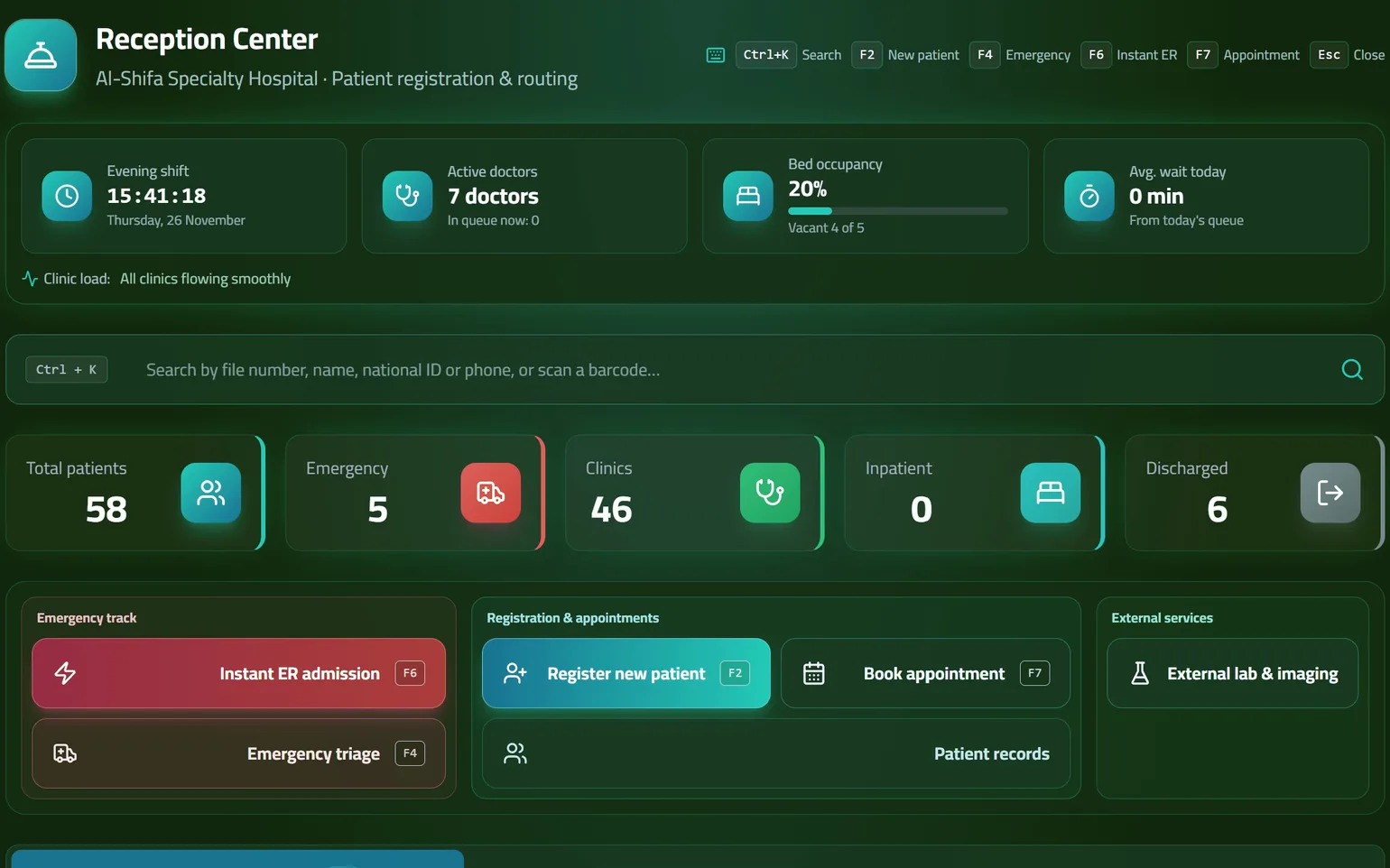
ClinivaSys reception screen with global patient search and emergency triage

How does a patient move through reception?

  1. 1

    Search first

    Staff search from a single box (Ctrl+K) by name, national ID, phone number or file number.

  2. 2

    A new record in seconds

    If the patient isn't found, their details are filled in by photographing their ID card with the camera.

  3. 3

    No duplicates

    Before saving, the system flags similar records and generates a unique medical record number.

  4. 4

    Triage and routing

    The case is classified, and the patient is routed to the right department and doctor.

  5. 5

    Ticket and queue

    A ticket prints with the queue number and a color-coded lane, and the patient joins the clinic queue automatically.

Features in detail

Everything reception needs on one screen, connected to every other department the moment a record is saved.

Fast, error-free registration

  • A complete record: personal details, age, sex, national ID and contact information.
  • ID card capture with the camera fills in the details without typing.
  • A unique medical record number for every patient prevents duplicate and split records.
  • Insurance type and insurer are recorded from the start, linking the patient to the right coverage.

Color-coded emergency triage

  • Quick triage at the desk with three levels: red critical, yellow urgent, green routine.
  • Immediate emergency admission (F6) for critical cases: a temporary emergency record lets treatment start before the paperwork is complete.
  • An instant, high-priority notification appears on the responsible doctor's screen the moment an emergency case is received.
  • In hospitals that activate the Emergency Department Board, the case moves on to five-level ESI triage and the emergency bed map.

Keyboard speed

The reception screen is designed to work without a mouse during peak hours.

  • Ctrl+KGlobal search
  • F2New patient
  • F4Emergency triage
  • F6Immediate ER admission
  • F7Book appointment
  • EscClose
  • Ctrl+F1Quick help

Tracking case pickup by doctors

  • A panel lists referred cases the doctor has not yet accepted, with the waiting time for each.
  • An "Unacceptable delay" alert after 30 minutes, with a Remind doctor or Assign doctor button.

Clear directions for the patient

  • Route the patient to a department or clinic, and link them to a named doctor.
  • 80 mm thermal ticket with the queue number, the full destination and a QR code.
  • Automatic addition to the clinic queue and to the waiting-room screen (Comprehensive Package).

Safe identification throughout the stay

  • Patient wristband with barcode and QR code, used to verify identity before every medication or procedure.
  • Wristband reprinting for inpatients, with room and bed details.

More services from the same desk

  • Lab and imaging result handover with its own queue, separate from the examination queue.
  • External lab and imaging orders without opening a full record, converted into a patient record in one click when needed.
  • Admissions, beds and discharge from a tab inside the reception screen itself.
  • A live status bar in front of staff: active doctors, bed occupancy, average waiting time and a clinic-load indicator.

Full accountability

  • Every reception action is recorded in the audit log with the staff member's name and the time.

What each team gains

Reception staff

Faster registration with less typing, and no duplicate records to fix later.

Doctors

Emergency cases reach them immediately, and clinic patients arrive with a complete record.

Patients

Shorter waits, clear directions, and orderly calling instead of crowding at the desk.

Management

Accurate data from the very first touchpoint, with every action documented by name.

Frequently asked questions

Questions about this module

If you don't find your answer, message us directly.

How does the system prevent duplicate patient records?

It generates a unique medical record number for each patient and automatically searches for similar records by name, national ID and phone number before any new record is created.

Can a patient be registered from their ID card?

Yes. Staff photograph the card with the camera, and the details are filled in automatically.

How are emergency cases handled?

They are triaged with three colors, the responsible doctor is notified instantly, and a temporary emergency record can be opened so treatment starts before the details are complete.

What hardware does reception need?

A computer or iPad, an 80 mm thermal printer for tickets, a wristband printer, a camera for reading ID cards, and an optional barcode scanner.

See this module at work in a live demo

Our team shows it to you on screen, on the latest version of the system. Or request a 14-day on-site trial at your facility.

↑↓ to moveEnter to openEsc to close

Book a live demo

One of our team walks you through ClinivaSys on a video call in about 30 minutes, focusing on what matters to your facility. Leave your details and we will contact you within 24 hours to set the time.

We confirm the time and the call link with you on WhatsApp or by email.

Request an on-site ClinivaSys trialRequest a quote for your facility

We install the system on your hospital's server with a 14-day trial key, plus a demo session for each team. No commitment, no payment details.Tell us about your facility's size and needs, and we'll send you a detailed quote within 24 hours.

Step 1 of 3 · Facility details

ClinivaSys

Full system tour · 18:42 min · narrated in Arabic

Watch ClinivaSys at work inside a hospital, from reception to discharge

Jump to a chapter

Watch on YouTube All 40 chapters with written summaries (Arabic)